Question
How to get distinct list of file extension in a directory and sub directory in windows?
Option 1: List of file extension
- Open notepad and paste “script 1” into this file
- Save file with “.bat” extension
- Open cmd in the directory that has “.bat” file
- Run “script 2” to output distinct list of file extension into “output.txt” file.
- Replace “path” in script 2 with actual path you want to traverse
Script 1
@echo off

set target=%~1
if "%target%"=="" set target=%cd%

setlocal EnableDelayedExpansion

set LF=^


rem Previous two line left blank for LF to work

for /f "tokens=*" %%i in ('dir /b /s /a:-d "%target%"') do (
    set ext=%%~xi
    if "!ext!"=="" set ext=FileWithNoExtension
    echo !extlist! | find "!ext!:" > nul
    if not !ERRORLEVEL! == 0 set extlist=!extlist!!ext!:
)

echo %extlist::=!LF!%

endlocal
Script 2
batchfile "path" >output.txtOption 2:
- Create new folder
- Open power shell in this folder (shift + right mouse click)
- Run following command to output distinct list of file extension in a directory in output.txt file
- Replace “\\path” with directory path that you want to traverse
Get-Childitem "\\path" -Recurse | WHERE { -NOT $_.PSIsContainer } | Group Extension -NoElement | Sort Count -Desc > output_ps.txt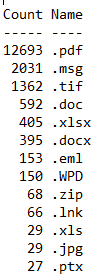
Other useful link
Windows file extensions
Jupyter start up folder
Highlight Excel rows

 Simplyfies
2 thoughts on “List of file extension in a directory”