By default, the ADLS storage account that is configured for either F&O Export to Data Lake or Synapse Link for Dataverse must have Blob public access Enabled. Following steps can be used to Disable Public Access on D365 Export to Data Lake.
1. Provision the ADLS storage account to a different region than the DV/F&O environment. The region must be different because services that are deployed in the same region as the storage account use private Azure IP addresses for communication. You cannot restrict access to Azure services based on their public outbound IP address range.
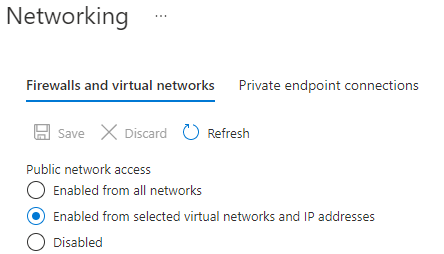
2. Disable Public Access on D365 Export to Data Lake: Disable blob public access on the ADLS storage account and set option to allow access from selected IP addresses.
3. Run the following script to generate the list of IP addresses of the underlying Power Platform services that require access. These services are all tagged with PowerPlatformInfra.
((Get-AzNetworkServiceTag -location <region of Dynamics environment>).Values | Where-Object {$_.Name -iin "PowerPlatformInfra.<region of Dynamics environment>"}).Properties.AddressPrefixes
4. Build another script to insert the list of allowable IP addresses generated by #3 into the storage account IP address exceptions using the following:
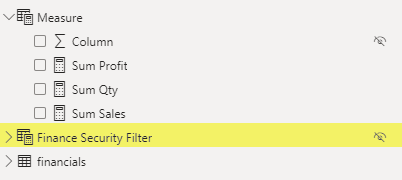
Create an Empty Power BI table and name it “Finance Security Filter”. As Object Level Security can only be applied to Tables and Column. So we are creating a new empty power bi table.
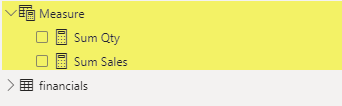
It will be used in combination with Power BI Roles to Hide Power BI Measure for people that belong to “Sales” Security Role.
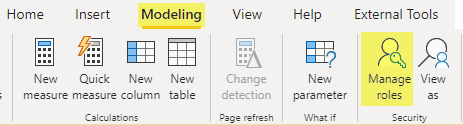
Create two new Power BI Security Roles and Name these “Sales” and “Finance”. We will use Tabular Editor in step 5 to Disable Sales group access from “Finance Security Filter” table that we created in Step 1.
Manage Roles
Create Sales and Finance Roles
3. Create New Measure with Table Filter
Create a new measure using the following expression. In this scenario, we are creating “Sum Profit” Measure.
New Measure
Sum Profit =
//Variable to Create Dependency on Empty PBI Table
var fnsecurity = 'Finance Security Filter'
//Sum of Profit
Return sum(financials[Profit])
Here we have created a new variable just to create dependency of this measure on Empty Power BI table “Finance Security Filter”
4. Open and Setup Tabular Editor
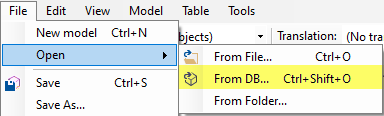
Download and Install Tabular Editor Free Edition and Connect with Powerbi Desktop Model. After a successful connection, we will be able to see Security Roles and Model Tables.
Connect with Power BI Model
Connect with Local Model
Power BI Model Objects
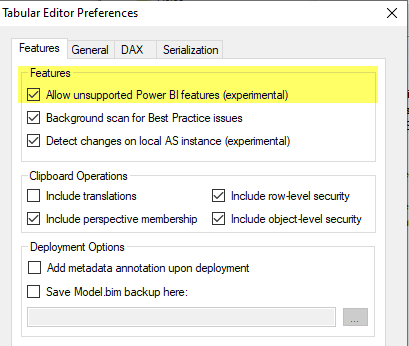
Update Preferences to Allow Unsupported Power BI Feature. Enabling this will allow us to see Object Level Security settings. Restart Tabular Editor after this.
Preferences
5. HIDE FILTER TABLE FOR SALES Role
Select “Finance Security Filter” Table and Remove Sales Role Access from it using Properties.
Go to Object Level Security, Select Sales Role, and set the value to None against it. Setting this property will remove Sales Role access from “Finance Security Filter” table and any Measure that is using this table. i.e. “Sum Profit” measure.
Save Changes (ctrl + s) in Tabular Editor after this update.
Object Level Security
6. Test New Security Setup
Just to summarize, we created “Sum Profit” measure with dependency on “Finance Security Filter” table. Besides this, we also removed “Sales” Role access from this table using Tabular Editor. Now let us test if the new configuration is working as intended or not.
Go to power bi desktop security and select view as “Sales” Role.
View as Sales
Sum Profit Measure is no longer visible to anyone that belongs to Sales Role. We have successfully hidden power bi measure.
Switching Role back to Finance with Show all the measures again.
Right-click https://dl.google.com/cloudsql/cloud_sql_proxy_x64.exe and select Save Link As to download the Cloud SQL Auth proxy. Rename the file to cloud_sql_proxy.exe. Place the executable (.exe) file in newly create Folder in Step 1.
Step 3– .bat File
Paste following command in notepad and save it as a batch file (.bat). Place bat file in Directory created in Step 1
cd C:\CloudProxy\
cloud_sql_proxy -instances=dev-data:us-central1:sql2017=tcp:1425 -credential_file=dev-data-svc.json
Pause
Above command requires instance and credential_file parameters.
Instance: Get Cloud SQL Instance name by going into Google Cloud Console and then into SQL to list all instances. Get Instance Connection Name of the required Instance. Highlighted column in following snapshot contains Instance connection name.
SQL Instance Connection Name
Credential_File: This is the credential file name that contains Google Cloud Service account used for Connection.
Follow this link for steps to generate Service Account Json key File. Service account should have “cloudsql.instances.connect” permissions for a successful connection.
Place Json key file in directory created in Step 1
Step 4– VBScript
Create VBScript file and Place it in directory created in Step 1. VBScript file should have following commands.
Set WshShell = CreateObject("WScript.Shell")
WshShell.Run chr(34) & "C:\CloudProxy\cloudSQL.bat" & Chr(34), 0
Set WshShell = Nothing
After Step 4 “C:\CloudProxy\” Directory should have following files.
Step 5 – Scheduler Task
Open Windows Task Scheduler
Create a new folder
Create Basic Task in the new Folder
Set Trigger as Highlighted Below
Set Action as below
Browse to Directory Created in Step 1 and select VBScript File
Verify Task Details and Finish Setup
New Windows Scheduler Task setup is now completed. This task should start automatically on windows startup.
Note: Account that is running this task should have script execution permissions.
Home buying process can be confusing specially for first time home owner. You can come across a lot of new terminologies during home buying experience. This post contains high level checklist of main steps involved in this process and also summarizing some of the terms and meaning of those for the First Time Home Owner.
Home Buying Check List?
High level list of Activities and Stages of Home Buying Process for First Time Home Owner.
Cleanup Your Credit (Pay Your Bills , Avoid New Accounts and Big Purchase)
A mortgage is an agreement between you and a lender that allows you to borrow money to purchase or refinance a home and gives the lender the right to take your property if you fail to repay the money you’ve borrowed
What is Home Mortgage or Financing?
A home mortgage is a loan given by a bank, mortgage company or other financial institution for the purchase of a residence—either a primary residence, a secondary residence, or an investment residence—in contrast to a piece of commercial or industrial property. In a home mortgage, the owner of the property (the borrower) transfers the title to the lender on the condition that the title will be transferred back to the owner once the final loan payment has been made and other terms of the mortgage have been met.
Prequalification is an early step in your homebuying journey. When you prequalify for a home loan, you’re getting an estimate of what you might be able to borrow, based on information you provide about your finances, as well as a credit check.
What is Pre-Approval?
A mortgage Pre-Approval is a letter from a lender indicating the type and amount of loan you can qualify for. The preapproval letter is issued after the lender has evaluated your financial history, including pulling your credit report and score. Getting preapproved also helps you find a mortgage lender that can work with you to select a home loan with an interest rate and other terms suited to your needs.
Pre Approval Benefits:
Show real estate agents that you’re serious
Place strong offers on properties that you’re interested in
Show potential sellers that you’re serious and financially eligible
Fixed vs adjustable Payment Type?
Fixed-Rate Mortgage
Adjustable-Rate Mortgage
Consistent interest rate for the entire loan term
Lower interest rates at the beginning of the loan
Easy to budget for (monthly payments are always the same)
There’s a chance interest rates could decrease later on
Good for long-term homeowners
Good for short-term homeowners
No prepayment penalties
What is Earnest Money?
When you find a home and enter into a purchase contract, the seller may withdraw the house from the market. Earnest money or good faith deposit, is a sum of money you put down to demonstrate your seriousness about buying a home.
You deliver the amount when signing the purchase agreement or the sales contract. This Money is going to be counted toward the Down Payment on Closing.
What is Property Appraisal?
Real estate appraisal or property valuation is the process of developing an opinion of value for real property. This is an estimate of price for your property in the current market.
What is Closing?
The final stage in your home buying journey will be to close on your new home and obtain a free and clear title to the property. Obtaining Title Ensures that no other person, organization, or government has any legal or financial claim that would limit ownership rights.
To obtain this title, you pay a title company or title attorney to examine the public record for any outstanding claims against the property and provide title insurance to protect your investor’s interest in the property. The closing itself and signing of paperwork typically takes 1-2 hours.
Other Questions you may be Asked?
You may come across following term during Mortgage stage of home buying process. Mortgage company may ask you following question. Either you falls into these categories or not, it is better to understand what these terms means.
Do you have any judgements or liens against you?
Have you had any foreclosures in the last 7 years?
Have you had any short sales in the last 4 years
Have you filed for bankruptcy in the last 7 years?
What is Judgement?
A judgment occurs when the creditor wins their case against you in court. It allows the creditor to pursue ways to recoup the debt you owe e.g. by placing a Lien on your real estate. A judgment could be filed against you in several ways.
You fail to show up in court
The debt is legally yours
What is Property Lien?
A creditor can place a lien on your real estate holdings. The creditor notifies lenders of the lien. Therefore, if you sell your property or try to transfer the property, you would need to satisfy the debt first. A lien against property can be automatic in New York when a judgment is obtained in the county in which the judgment is recorded.
What is Foreclousure?
Foreclosure is the legal process by which a lender attempts to recover the amount owed on a defaulted loan by taking ownership of the mortgaged property and selling it.
Creditor or Lender?
A creditor or lender is a person or institution to whom money is owed. The first party, in general, has provided some property or service to the second party under the assumption that the second party will return an equivalent property and service.
What is Short Sales?
A short sale occurs when you sell stock you do not own. Investors who sell short believe the price of the stock will fall. If the price drops, you can buy the stock at the lower price and make a profit. If the price of the stock rises and you buy it back later at the higher price, you will incur a loss.
With a fixed-rate mortgage, you get a set interest rate and payment for the entire loan term. Adjustable-rate mortgages, on the other hand, have rates that can change over time.
What is Bankruptcy?
Bankruptcy is a legal proceeding involving a person or business that is unable to repay their outstanding debts. The bankruptcy process begins with a petition filed by the debtor, which is most common, or on behalf of creditors, which is less common. All of the debtor’s assets are measured and evaluated, and the assets may be used to repay a portion of the outstanding debt.
This article evaluate and demonstrate capabilities of Fivetran and showcase improvements that can be brought in by implementing Fivetran over Nifi for overall ingestion process currently implemented at Regeneron for Data eco system.
Nifi has certain limitations which are highlighted below which indicates the areas where it can be problem in near future w.r.t to growing data needs and streamlining the ingestion process for this growing data into overall Data eco system.
No managed services.
No alerting mechanism provided by tool itself.
No hook for Airflow/MWAA scheduler to send the jobs to spark once ingestion is completed.
Nifi scalability issue
Comparative Analysis
Comparative analysis between Nifi and Fivetran based on the high-level capabilities both the products have to offer.
Supported Formats:
Nifi
Fivetran
NIFI can read different file format and convert it to csv. -Avro -ConvertRecordProcessor -getfile -json -NiFi
-Separated Value Files (CSV*, TSV, etc.) -JSON Text files delimited by new lines -JSON Arrays -Avro -Compressed — Zip, tar, GZ -Parquet -Excel
Source Integration
Nifi
Fivetran
Nifi can connect with following sources: – s3 – Google Cloud – Azure Blob
CData JDBC Driver pair required for the following sources – Box – Dropbox – Google Drive – OneDrive – Sharepoint
Sync with below cloud-based storages: – S3 – Azure Blob – Google Cloud – Magic Folder: (Magic Folder connectors sync any supported file from your cloud folder as a table within a schema in your destination.)
Sync supported through Magic Folder: – Box – Dropbox – Google Drive – OneDrive – Sharepoint
-Basic SQL transformations -dbt transformations dbt is an open-source software that enables you to perform sophisticated data transformations in your destination using simple SQL statements.
With dbt, you can: – Write and test SQL transformations – Use version control with your transformations – Create and share documentation about your dbt transformations – View data lineage graphs
Alerting
Nifi
Fivetran
You can use the Monitor Activity processor to alert on changes in flow activity by routing alert to Put Email processor
Only present on dashboard but if sync fails it can send email notification provided its enabled.
NOTE: Tasks describe a problem that keeps Fivetran from syncing your data.
Warnings describe a problem that you may need to fix, but that does not keep Fivetran from syncing your data.
Listener
Nifi
Fivetran
-Maintain state for incremental load using state object -Event-based is supported -Scheduling also supported
-Maintain state for incremental load using state object -Event-based is supported -Scheduling also supported
Scalability
Nifi
Fivetran
Possible but difficult
Possible but difficult
Trigger for Auto-Start Transformation Job
Nifi
Fivetran
No trigger, must rely on scheduling times.
Integration with Apache Airflow is Supported. Fivetran’s syncs enable the ability to trigger data transformations from Fivetran syncs.
GitHub with account having permissions for following GitHub scopes: -repo -read:org -admin:org_hook -admin:repo_hook
Configuration REST API
Nifi
Fivetran
The configuration API can manage -Access -Controller -Controller Services -Reporting Tasks -Flow -Process Groups -Processors -Connections -FlowFile Queues -Remote Process Groups -Provenance
Can write the custom for data source or a private API that fivetran don’t support, you can develop a serverless ELT data pipeline using our Function connectors.
Super Bowl LVI (2022) will be the 56th in the history of the National Football League (NFL) and the 52nd in the modern era of the championship game. The most awaited and exciting game is about to go live and will captivate the audience. It’s the final game of the 2021 season and the final round of the NFL playoffs for the 2021–22 season, which ends here.
Where: SoFi Stadium, Inglewood, California
SoFi Stadium
The game (2022 Super Bowl LVI) will be held at SoFi Stadium in Inglewood, California, on February 13, 2022. For the first time, SoFi Stadium will host a major sporting event in the form of the Super Bowl.
As a result of the NFL’s new 17-game schedule for this season, the Super Bowl will be played one week later than usual, right around the 2022 Winter Olympics in Beijing. Fans can enjoy this year’s Super Bowl broadcast by NBC and streamed live on Peacockor the NBC Sports app. For important events like the Super Bowl, SoFi Stadium may be expanded to accommodate up to 100,240 spectators, increasing the stadium’s standard seating capacity of 70,240.
Half Time Show
Half Time Show
The most thrilling performances are seen by entertainers and musicians on the halftime show of the Super Bowl. This time, the halftime show for Super Bowl 56 will include five rap and R&B legends at SoFi Stadium in Inglewood, California.
One of the world’s most prestigious platforms will be graced by the likes of Dr. Dre, the founder of Aftermath Entertainment and Beats headphones. A multi-talented rapper and entrepreneur. Another one is Snoop Dogg, the terrific rapper who will captivate the audience. Furthermore, Eminem will put even more enticement for the viewers, with Mary J. Blige bringing a lot of viewers, maybe just for the halftime. And lastly, Kendrick Lamar will mesmerize the youngsters with his performance. Mary J. Blige will make her second appearance at the Super Bowl halftime show, having previously played in the halftime show in 2001. They have collectively won 43 Grammys and had 21 number-one albums on the Billboard chart. This means that the stage will always be on fire and amaze the audience. However, the surprise guests are not expected this time as the show is already packed with the quintet, and hopefully, they will dazzle the viewers as always. Also, the national anthem singer isn’t decided uphill now, and the fans have to wait a bit more to reveal the name.
Super Bowl LV (2021)
Who Won? (Tampa Bay Buccaneers)
When: February 7, 2021
The Super Bowl has been a thrill for viewers for decades now. The Buccaneers won the Super Bowl for the second time in their history last Super Bowl 55. Tom Brady won the Super Bowl seven times and astonished the audience. The Chiefs were denied a second Super Bowl title by Tom Brady and the Patriots on February 7 last year.
This article will go through steps to Execute SQL command or Stored Procedure and Export Data to CSV file. These Steps can be automated using SQL Server Agent Job.
Add 3rd Step in SQL Agent Job to Push data to AWS S3 Bucket. BAT file referenced in below command needs to be placed on SQL Server. This BAT File will have S3 Target Location and Profile Information.
set CUR_YYYY=%date:~10,4%
set CUR_MM=%date:~4,2%
set CUR_DD=%date:~7,2%

aws s3 cp C:\Users\Public\DataExports\Product_%CUR_YYYY%%CUR_MM%%CUR_DD%.csv s3://s3-folder/sales/ --profile S3AWS --acl bucket-owner-full-control
This post will go through steps to test sftp connection from windows and linux. On windows there are free sftp client tool available as well like filezilla and winscp. These can also be used to test sftp connectivity. But incase we want to test the connection quickly without going through download and install process then cmd comes in handy for windows, given that telnet is enabled on windows already.
Test sftp Connection from Windows
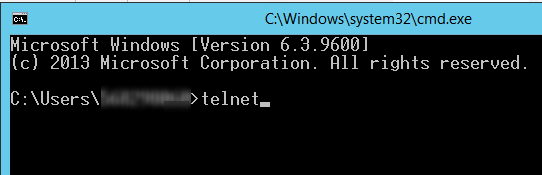
1- Press “Windows Key + R” to open Command Prompt 2- Type Telnet and press Enter
cmd – telnet
3- Enter sftp path after keyword “o” in following format and press Enter o sftppath port
sftp test
4- We will get to following screen if sftp connection was successful or sftp url was reachable. otherwise error will be received in case of failure.
we can type “Help” once telnet session is opened to get details of helpful keyword
telnet help
Test sftp Connection from Linux
1- SSH into Linux instance 2- Type sftp path in following format to test sftp URL sftp username@sftppath
Linux sftp connect
3- Enter sftp password once prompt is received. This means that sftp URL is reachable. 4- If credentials are correct, you will be able to connect with sftp and browse directories and files.
Error “Unable to negotiate with xx.xxx.xxx.xx port 22: no matching host key type found. Their offer: ssh-dss”.
error message – No Matching Key
The reason for this error is because OpenSSH’s new update disables ssh-dss. In the OpenSSH release note, it states the changes since OpennSSH 6.9 Support for ssh-dss, ssh-dss-cert-* host and user keys are disabled. By default at run-time. To re-enable it please use following steps.
Use following steps to add new entry in ssh_config file
Go to directory in SSH terminal by typing “cd /etc/ssh”
Open Config file using command “sudo vim ssh_config”
Add New Entry “HostKeyAlgorithms ssh-dss” at the end of file
In following article, we have tried to lay out the comparisons of Spark SQL vs Presto. When it comes to checking out Spark Presto, there are some differences that we need to be aware of
Commonality:
Both open source, “big data” software frameworks
Distributed, Parallel and in-memory
BI tools connect to them using JDBC/ODBC
Both have been tested and deployed at petabyte-scale companies
Can be run on premise or in the cloud. They can also be containerized
Differences:
Presto
Spark SQL
Presto is an ANSI SQL:2003 query engine for accessing and unifying data from many different data sources. It’s deployed as a middle-layer for federation
Spark is a general-purpose cluster-computing framework. Core Spark does not support SQL – for SQL support you install the Spark SQL module which adds structured data processing capabilities. Spark SQL is also ANSI SQL:2003 compliant (since Spark 2.0)
Presto is more commonly used to support interactive SQL queries. Queries are usually analytical but can perform SQL-based ETL
Spark is more general in its applications, often used for data transformation and Machine Learning workloads
Presto supports querying data in object stores like S3 by default, and has many connectors available. It also works really well with Parquet and Orc format data
Spark must use Hadoop file APIs to access S3 (or pay for Databricks features). Spark has limited connectors for data sources
Enable following advance options in Microsoft SQL Server by running following SQL statement in SSMS. These option are must to Call API End Point from SQL Server.
sp_configure 'show advanced options', 1;
go
RECONFIGURE;
GO
sp_configure 'Ole Automation Procedures', 1;
GO
RECONFIGURE;
GO
SQL Script to Call API End Point from SQL Server
Following script Prepare and Send API request. Request URL, Headers and Body are defined using SQL parameters.
-----------------------
--Variables
-----------------------
DECLARE
--Add API end Point URL here
@Url varchar(8000) = ''

--Define Request Type POST,GET
,@Method varchar(5) = 'POST'

--normally json object string : '{"key":"value"}'
,@BodyData nvarchar(max) = '{"InventoryType": "Delivery","RequestedDate": "09/02/2021","StoreId": ""}'

--Basic auth token, Api key
,@Authorization varchar(8000) = NULL

--'application/xml'
,@ContentType varchar(255) = 'application/json'

--token of WinHttp object
,@WinTokken int
,@ReturnCode int;

Declare @Response TABLE (ResponseText nvarchar(max));


-----------------------
--Create Token
-----------------------
--Creates an instance of WinHttp.WinHttpRequest
EXEC @ReturnCode = sp_OACreate 'WinHttp.WinHttpRequest.5.1',@WinTokken OUT
IF @ReturnCode <> 0 GOTO EXCEPTION

--Opens an HTTP connection to an HTTP resource.
EXEC @ReturnCode = sp_OAMethod @WinTokken, 'Open', NULL, @Method/*Method*/, @Url /*Url*/, 'false' /*IsAsync*/
IF @ReturnCode <> 0 GOTO EXCEPTION

-----------------------
--Create Headers
-----------------------
--Create Request Headers. As of now this request include Authorization and Content-Type in headers.
IF @Authorization IS NOT NULL
BEGIN
	EXEC @ReturnCode = sp_OAMethod @WinTokken, 'SetRequestHeader', NULL, 'Authorization', @Authorization
	IF @ReturnCode <> 0 GOTO EXCEPTION
END

IF @ContentType IS NOT NULL
BEGIN
	EXEC @ReturnCode = sp_OAMethod @WinTokken, 'SetRequestHeader', NULL, 'Content-Type', @ContentType
	IF @ReturnCode <> 0 GOTO EXCEPTION
END

-- New Header can be added like below commented code
--IF @OUN IS NOT NULL
--BEGIN
--	EXEC @ReturnCode = sp_OAMethod @WinTokken, 'SetRequestHeader', NULL, 'OUN', @OUN
--	IF @ReturnCode <> 0 GOTO EXCEPTION
--END

-----------------------
--Send Request
-----------------------
--Sends an HTTP request to an HTTP server. Following Code Defines Request Body
IF @BodyData IS NOT NULL
BEGIN
	EXEC @ReturnCode = sp_OAMethod @WinTokken,'Send', NULL, @BodyData
	IF @ReturnCode <> 0 GOTO EXCEPTION
END
ELSE
BEGIN
	EXEC @ReturnCode = sp_OAMethod @WinTokken,'Send'
	IF @ReturnCode <> 0 GOTO EXCEPTION
END

IF @ReturnCode <> 0 GOTO EXCEPTION

-----------------------
--Get Response
-----------------------
--Get Response text
INSERT INTO @Response (ResponseText)
EXEC @ReturnCode = sp_OAGetProperty @WinTokken,'ResponseText'

IF @ReturnCode <> 0 GOTO EXCEPTION
IF @ReturnCode = 0 GOTO RESULT

-----------------------
--Exception Block
-----------------------
EXCEPTION:
	BEGIN
		DECLARE @Exception TABLE
		(
			Error binary(4),
			Source varchar(8000),
			Description varchar(8000),
			HelpFile varchar(8000),
			HelpID varchar(8000)
		)

		INSERT INTO @Exception EXEC sp_OAGetErrorInfo @WinTokken
		INSERT INTO	@Response (ResponseText)
		SELECT	(
					SELECT	*
					FROM	@Exception
					FOR		JSON AUTO
				) AS ResponseText
	END

-----------------------
--FINALLY
-----------------------
RESULT:
--Dispose objects
IF @WinTokken IS NOT NULL
	EXEC sp_OADestroy @WinTokken

-----------------------
--Result
-----------------------
SELECT	*  FROM	@Response




















 Simplyfies