Fivetran vs Nifi

What is Data Integration? | TIBCO Software
Data Integration

This article evaluate and demonstrate capabilities of Fivetran and showcase improvements that can be brought in by implementing Fivetran over Nifi for overall ingestion process currently implemented at Regeneron for Data eco system.

Nifi Limitations

Nifi has certain limitations which are highlighted below which indicates the areas where it can be problem in near future w.r.t to growing data needs and streamlining the ingestion process for this growing data into overall Data eco system.

  • No managed services.
  • No alerting mechanism provided by tool itself.
  • No hook for Airflow/MWAA scheduler to send the jobs to spark once ingestion is completed.
  • Nifi scalability issue

Comparative Analysis

Comparative analysis between Nifi and Fivetran based on the high-level capabilities both the products have to offer.

Supported Formats:

NifiFivetran
NIFI can read different file format and convert it to csv.
-Avro
-ConvertRecordProcessor
-getfile
-json
-NiFi
-Separated Value Files (CSV*, TSV, etc.)
-JSON Text files delimited by new lines
-JSON Arrays
-Avro
-Compressed — Zip, tar, GZ
-Parquet
-Excel

Source Integration

NifiFivetran
Nifi can connect with following sources:
– s3
– Google Cloud
– Azure Blob

CData JDBC Driver pair required for the following sources
– Box
– Dropbox
– Google Drive
– OneDrive
– Sharepoint
Sync with below cloud-based storages:
– S3
– Azure Blob
– Google Cloud
– Magic Folder: (Magic Folder connectors sync any supported file from your cloud folder as a table within a schema in your destination.)

Sync supported through Magic Folder:
– Box
– Dropbox
– Google Drive
– OneDrive
– Sharepoint

File Transfer Protocols

NifiFivetran
-FTP
-SFTP
-FTP
-FTPS
-SFTP

Supported Database Sources

NifiFivetran
-MongoDB
-Postgres
-MySql
-Oracle
-MS SQL
-CData JDBC Driver for MariaDB
-MongoDB
-MariaDB
-MySQL
-Oracle
-PostgreSQL
-SQL Server

Logging

NifiFivetran
-nifi-bootstrap.log
-nifi-user.log
-nifi-app.log
-In dashboard
-External Logging service
-In your destination using Fivetran
-Log Connector

Transformations

NifiFivetran
-Jolt (JoltTransformJSON Processor)
-XSLT (TransformXml Processor)
-Data Transformation using Scripts
(ExecuteScript Processor)
-Basic SQL transformations
-dbt transformations
dbt is an open-source software that enables you to perform sophisticated data transformations in your destination using simple SQL statements.

With dbt, you can:
– Write and test SQL transformations
– Use version control with your transformations
– Create and share documentation about your dbt transformations
– View data lineage graphs

Alerting

NifiFivetran
You can use the Monitor Activity processor to alert on changes in flow activity by routing alert to Put Email processorOnly present on dashboard but if sync fails it can send email notification provided its enabled.

NOTE: Tasks describe a problem that keeps Fivetran from syncing your data.

Warnings describe a problem that you may need to fix, but that does not keep Fivetran from syncing your data.

Listener

NifiFivetran
-Maintain state for incremental load using state object
-Event-based is supported
-Scheduling also supported
-Maintain state for incremental load using state object
-Event-based is supported
-Scheduling also supported

Scalability

NifiFivetran
Possible but difficultPossible but difficult

Trigger for Auto-Start Transformation Job

NifiFivetran
No trigger, must rely on scheduling times.Integration with Apache Airflow is Supported. Fivetran’s syncs enable the ability to trigger data transformations from Fivetran syncs.

Destination / Warehouses

NifiFivetran
-S3
-Postgres
-MongoDB
-MySql
-Oracle
-MS SQL
-CData JDBC Driver for MariaDB
Azure Synapse
-BigQuery
-Databricks
-MySQL BETA
-Panoply
Periscope
-PostgreSQL
-Redshift
-Snowflake
SQL Server

Account management

NifiFivetran
-client certificates
-username/password
-Apache Knox
-OpenId Connect
IAM / User Authentication Possible
-Azure AD (BETA)
-Google Workspace (BETA)
-Okta
-OneLogin
-PingOnes

Version Control

NifiFivetran
GitHubGitHub with account having permissions for following GitHub scopes:
-repo
-read:org
-admin:org_hook
-admin:repo_hook

Configuration REST API

NifiFivetran
The configuration API can manage
-Access
-Controller
-Controller Services
-Reporting Tasks
-Flow
-Process Groups
-Processors
-Connections
-FlowFile Queues
-Remote Process Groups
-Provenance
This feature is available only for Standard, Enterprise, and Business Critical accounts
User Management API 
-Group Management API 
-Destination Management API 
-Connector Management API 
-Certificate Management API 

Functions\Templates

NifiFivetran
YesCan write the custom for data source or a private API that fivetran don’t support, you can develop a serverless ELT data pipeline using our Function connectors.

Language Supported

NifiFivetran
-Python
-Java
-Python
-Java
-GO
-Node.JS

Streaming

NifiFivetran
Apache Kafka
-Amazon Kinesis
Apache Kafka
Amazon Kinesis
Snowplow Analytics
-Segment
-Webhooks

Super Bowl 2022 LVI (Sunday, Feb 13)

Masthead_SBLVI_2021_3840x1080

Super Bowl 2022

Super Bowl 2022 – LVI

https://www.nfl.com/super-bowl/event-info/event-overview

Who Won? (Los Angeles Rams)

MVP: Cooper Kupp Named MVP of Super Bowl 56

When: Sunday, Feb 13

Super Bowl LVI (2022) will be the 56th in the history of the National Football League (NFL) and the 52nd in the modern era of the championship game. The most awaited and exciting game is about to go live and will captivate the audience. It’s the final game of the 2021 season and the final round of the NFL playoffs for the 2021–22 season, which ends here.

Where: SoFi Stadium, Inglewood, California

SoFi Stadium - Wikipedia
SoFi Stadium

The game (2022 Super Bowl LVI) will be held at SoFi Stadium in Inglewood, California, on February 13, 2022. For the first time, SoFi Stadium will host a major sporting event in the form of the Super Bowl.

As a result of the NFL’s new 17-game schedule for this season, the Super Bowl will be played one week later than usual, right around the 2022 Winter Olympics in Beijing. Fans can enjoy this year’s Super Bowl broadcast by NBC and streamed live on Peacock or the NBC Sports app. For important events like the Super Bowl, SoFi Stadium may be expanded to accommodate up to 100,240 spectators, increasing the stadium’s standard seating capacity of 70,240.

Half Time Show

Super Bowl Halftime Show | NFL.com
Half Time Show

The most thrilling performances are seen by entertainers and musicians on the halftime show of the Super Bowl. This time, the halftime show for Super Bowl 56 will include five rap and R&B legends at SoFi Stadium in Inglewood, California.

One of the world’s most prestigious platforms will be graced by the likes of Dr. Dre, the founder of Aftermath Entertainment and Beats headphones. A multi-talented rapper and entrepreneur. Another one is Snoop Dogg, the terrific rapper who will captivate the audience. Furthermore, Eminem will put even more enticement for the viewers, with Mary J. Blige bringing a lot of viewers, maybe just for the halftime. And lastly, Kendrick Lamar will mesmerize the youngsters with his performance. Mary J. Blige will make her second appearance at the Super Bowl halftime show, having previously played in the halftime show in 2001. They have collectively won 43 Grammys and had 21 number-one albums on the Billboard chart. This means that the stage will always be on fire and amaze the audience. However, the surprise guests are not expected this time as the show is already packed with the quintet, and hopefully, they will dazzle the viewers as always. Also, the national anthem singer isn’t decided uphill now, and the fans have to wait a bit more to reveal the name.

Super Bowl LV (2021)

Who Won? (Tampa Bay Buccaneers)

When: February 7, 2021

The Super Bowl has been a thrill for viewers for decades now. The Buccaneers won the Super Bowl for the second time in their history last Super Bowl 55. Tom Brady won the Super Bowl seven times and astonished the audience. The Chiefs were denied a second Super Bowl title by Tom Brady and the Patriots on February 7 last year.

Where: Raymond James Stadium, Tampa, Florida

MVP: Tom Brady (Quarterback)

Half Time Show

Performers
The Weeknd

Export Data to CSV (SQL Server)

This article will go through steps to Execute SQL command or Stored Procedure and Export Data to CSV file. These Steps can be automated using SQL Server Agent Job.

Follow link to see SQL Server Agent Job creation Steps

Installing AWS CLI

Step 1:

  • Create new SQL Server Agent Job
  • Add First Step to Delete old files from Export Location
EXEC master..xp_cmdshell 'del C:\Users\Public\DataExports\Product_*.csv'

Step 2:

Add 2nd Step to SQL Agent Job that will Run Query or Stored Procedure and Export Data to CSV in a local Folder

DECLARE @FileName NVARCHAR(100)
DECLARE @RepDate NVARCHAR(10) 

SELECT   @RepDate = CONVERT(varchar(8), GETDATE() ,112)


SELECT 
	@FileName = 'Product_' + @RepDate + '.csv'

PRINT @FileName

DECLARE @SQL nvarchar(800)
SELECT 
 	@SQL = 'bcp "EXEC [Sales]..[Product]" queryout "C:\Users\Public\DataExports\' + @FileName + '" -S ' + @@SERVERNAME + ' -T -c -C 65001 -t"|"'

EXEC master..xp_cmdshell @SQL

Step 3:

Add 3rd Step in SQL Agent Job to Push data to AWS S3 Bucket. BAT file referenced in below command needs to be placed on SQL Server. This BAT File will have S3 Target Location and Profile Information.

Job Type: Operating System (Cmd Exec)

cmd.exe /c "C:\Users\Public\DataExports\S3AWSCLI-Product.bat > C:\Users\Public\DataExports\log_Product.txt"

BAT File Content (S3AWSCLI-Product.bat)


set CUR_YYYY=%date:~10,4%
set CUR_MM=%date:~4,2%
set CUR_DD=%date:~7,2%

aws s3 cp C:\Users\Public\DataExports\Product_%CUR_YYYY%%CUR_MM%%CUR_DD%.csv s3://s3-folder/sales/ --profile S3AWS --acl bucket-owner-full-control 

Create AWS Profile

Other Useful Links

Call API End Point from SQL Server Stored Procedure – Simplyfies

Database Interview Question and Answers (Part-1) – Simplyfies

Choosing Right Database for Application – Simplyfies

Test sftp Connection from Windows and Linux

Test sftp Connection from Windows and Linux
sftp connectivity test

This post will go through steps to test sftp connection from windows and linux. On windows there are free sftp client tool available as well like filezilla and winscp. These can also be used to test sftp connectivity. But incase we want to test the connection quickly without going through download and install process then cmd comes in handy for windows, given that telnet is enabled on windows already.

Test sftp Connection from Windows

1- Press “Windows Key + R” to open Command Prompt
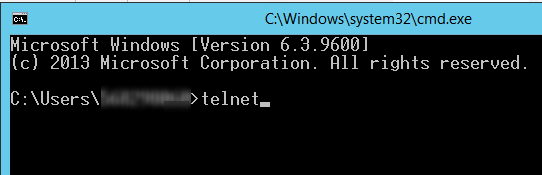
2- Type Telnet and press Enter

sftp connection - telnet
cmd – telnet

3- Enter sftp path after keyword “o” in following format and press Enter
o sftppath port

sftp connection - sftp path
sftp test

4- We will get to following screen if sftp connection was successful or sftp url was reachable. otherwise error will be received in case of failure.

successful sftp

we can type “Help” once telnet session is opened to get details of helpful keyword

telnet help
telnet help

Test sftp Connection from Linux

1- SSH into Linux instance
2- Type sftp path in following format to test sftp URL
sftp username@sftppath

Linux sftp commands
Linux sftp connect

3- Enter sftp password once prompt is received. This means that sftp URL is reachable.
4- If credentials are correct, you will be able to connect with sftp and browse directories and files.

Linux sftp help link

Possible Issue

Error “Unable to negotiate with xx.xxx.xxx.xx port 22: no matching host key type found. Their offer: ssh-dss”.

no matching key
error message – No Matching Key

The reason for this error is because OpenSSH’s new update disables ssh-dss. In the OpenSSH release note, it states the changes since OpennSSH 6.9 Support for ssh-dss, ssh-dss-cert-* host and user keys are disabled. By default at run-time. To re-enable it please use following steps.

Use following steps to add new entry in ssh_config file

  1. Go to directory in SSH terminal by typing “cd /etc/ssh”
  2. Open Config file using command “sudo vim ssh_config”
  3. Add New Entry “HostKeyAlgorithms ssh-dss” at the end of file
  4. Repeat Connection Steps Again
  5. sftp should be accessible after this update
ssh_config file New Entry
sftp connect success
sftp is connected successfully

Related Links

Jupyter notebook startup folder
List file extension in windows
Hide power-bi measures
Azure function based rest api

Spark SQL vs Presto

In following article, we have tried to lay out the comparisons of Spark SQL vs Presto. When it comes to checking out Spark Presto, there are some differences that we need to be aware of

Commonality:

  • Both open source, “big data” software frameworks
  • Distributed, Parallel and in-memory
  • BI tools connect to them using JDBC/ODBC
  • Both have been tested and deployed at petabyte-scale companies
  • Can be run on premise or in the cloud. They can also be containerized

Differences:

PrestoSpark SQL
Presto is an ANSI SQL:2003 query engine for accessing and unifying data from many different data sources.  It’s deployed as a middle-layer for federationSpark is a general-purpose cluster-computing framework. Core Spark does not support SQL – for SQL support you install the Spark SQL module which adds structured data processing capabilities. Spark SQL is also ANSI SQL:2003 compliant (since Spark 2.0)
Presto is more commonly used to support interactive SQL queries.  Queries are usually analytical but can perform SQL-based ETLSpark is more general in its applications, often used for data transformation and Machine Learning workloads
Presto supports querying data in object stores like S3 by default, and has many connectors available. It also works really well with Parquet and Orc format dataSpark must use Hadoop file APIs to access S3 (or pay for Databricks features). Spark has limited connectors for data sources

Use EBS volume in EKS

Managing storage is a distinct problem from managing compute instances. The PersistentVolume subsystem provides an API for users and administrators that abstracts details of how storage is provided from how it is consumed. To do this, Kubernetes has two API resources: PersistentVolume and PersistentVolumeClaim.

Amazon Elastic Block Store (EBS) is an easy-to-use, scalable, high-performance block-storage service designed for Amazon Elastic Compute Cloud (EC2).

In traditional model EBS volume is directly attached to VM in AWS and processes on VM view it as a native disk drive. In Kubernetes Cluster (EKS) we can use the same EBS volumes and directly consume them inside the application pods. The volume is still attached to a specific node inside the cluster but PV and PVC make creating and consuming the volume inside the pod easier.

I will walk you through a scenario where we will dynamically create a EBS volume and use it inside our pod.

The first step is to create a persistent volume claim (PVC). PVC is the specification for a volume. In PVC we will define what type of persistent storage we want.

kind: PersistentVolumeClaim
apiVersion: v1
metadata:
  name:  my-app-pvc
  annotations:
    volume.beta.kubernetes.io/storage-class: fast
spec:
  accessModes:
    - "ReadWriteOnce"
  resources:
    requests:
      storage: "1Gi"

Save it as pvc.yaml

The annotation for storage class is not required but we can use it if we are using a custom storage class. By default EKS cluster already has a storage class that is used by PVC if no annotation is added.

We will need to apply this manifest to provision our persistent volume that will in turn create an EBS volume.

kubectl apply -f pvc.yaml

Run this command to get status of PVC and PV.

kubectl get pvc,pv

Next we will use this persistent volume. We will create a simple deployment to use this PVC.

apiVersion: apps/v1
kind: Deployment
metadata:
  name: wordpress-mysql
  labels:
    app: wordpress
spec:
  selector:
    matchLabels:
      app: wordpress
      tier: mysql
  strategy:
    type: Recreate
  template:
    metadata:
      labels:
        app: wordpress
        tier: mysql
    spec:
      containers:
      - image: mysql:5.6
        name: mysql
        env:
        - name: MYSQL_ROOT_PASSWORD
          valueFrom:
            secretKeyRef:
              name: mysql-pass
              key: password
        ports:
        - containerPort: 3306
          name: mysql
        volumeMounts:
        - name: mysql-persistent-storage
          mountPath: /var/lib/mysql
      volumes:
      - name: mysql-persistent-storage
        persistentVolumeClaim:
          claimName: my-app-pvc

In our deployment manifest inside volumes block we use persistentVolumeClaim key to link out earlier created PVC.

After applying the deployment we can see that PV is bound to newly created pod and application can write data to this volume.

If your cluster is spanning over multiple availability zones it is good idea to create a new storage class with specific availability zones. So that volumes are created in specific zone. Also we will need to use topology aware pod scheduling to avoid any problems when pod is restarted or rescheduled.

You can create a new storage class with zone topology as follows.

kind: StorageClass
apiVersion: storage.k8s.io/v1
metadata:
  name: gp2-east-1b
  annotations:
    storageclass.kubernetes.io/is-default-class: "true"
provisioner: kubernetes.io/aws-ebs
parameters:
  type: gp2
reclaimPolicy: Retain
allowedTopologies:
- matchLabelExpressions:
  - key: failure-domain.beta.kubernetes.io/zone
    values:
    - us-east-1b

You’ll also need to add affinity to your deployment spec.template.spec block.

      affinity:
        podAffinity:
          requiredDuringSchedulingIgnoredDuringExecution:
          - labelSelector:
              matchExpressions:
              - key: app
                values:
                - us-east-1b
            topologyKey: "failure-domain.beta.kubernetes.io/zone"    

Call API End Point from SQL Server

This post go through steps and process to Call API End Point from SQL Server Stored Procedure. These steps are applicable for Microsoft SQL Server.

Follow following links to know more about different type of databases and SQL Server Concepts.

Pre-Requisites

Enable following advance options in Microsoft SQL Server by running following SQL statement in SSMS. These option are must to Call API End Point from SQL Server.

sp_configure 'show advanced options', 1;
go
RECONFIGURE;
GO
sp_configure 'Ole Automation Procedures', 1;
GO
RECONFIGURE;
GO

SQL Script to Call API End Point from SQL Server

Following script Prepare and Send API request. Request URL, Headers and Body are defined using SQL parameters.

-----------------------
--Variables
-----------------------
DECLARE
--Add API end Point URL here
@Url varchar(8000) = ''

--Define Request Type POST,GET
,@Method varchar(5) = 'POST'

--normally json object string : '{"key":"value"}'
,@BodyData nvarchar(max) = '{"InventoryType": "Delivery","RequestedDate": "09/02/2021","StoreId": ""}'

--Basic auth token, Api key
,@Authorization varchar(8000) = NULL

--'application/xml'
,@ContentType varchar(255) = 'application/json'		

--token of WinHttp object
,@WinTokken int 
,@ReturnCode int; 

Declare @Response TABLE (ResponseText nvarchar(max));


-----------------------
--Create Token
-----------------------
--Creates an instance of WinHttp.WinHttpRequest
EXEC @ReturnCode = sp_OACreate 'WinHttp.WinHttpRequest.5.1',@WinTokken OUT
IF @ReturnCode <> 0 GOTO EXCEPTION

--Opens an HTTP connection to an HTTP resource.
EXEC @ReturnCode = sp_OAMethod @WinTokken, 'Open', NULL, @Method/*Method*/, @Url /*Url*/, 'false' /*IsAsync*/
IF @ReturnCode <> 0 GOTO EXCEPTION

-----------------------
--Create Headers
-----------------------
--Create Request Headers. As of now this request include Authorization and Content-Type in headers.
IF @Authorization IS NOT NULL
BEGIN
	EXEC @ReturnCode = sp_OAMethod @WinTokken, 'SetRequestHeader', NULL, 'Authorization', @Authorization
	IF @ReturnCode <> 0 GOTO EXCEPTION
END

IF @ContentType IS NOT NULL
BEGIN
	EXEC @ReturnCode = sp_OAMethod @WinTokken, 'SetRequestHeader', NULL, 'Content-Type', @ContentType
	IF @ReturnCode <> 0 GOTO EXCEPTION
END

-- New Header can be added like below commented code
--IF @OUN IS NOT NULL
--BEGIN
--	EXEC @ReturnCode = sp_OAMethod @WinTokken, 'SetRequestHeader', NULL, 'OUN', @OUN
--	IF @ReturnCode <> 0 GOTO EXCEPTION
--END

-----------------------
--Send Request
-----------------------
--Sends an HTTP request to an HTTP server. Following Code Defines Request Body
IF @BodyData IS NOT NULL
BEGIN
	EXEC @ReturnCode = sp_OAMethod @WinTokken,'Send', NULL, @BodyData
	IF @ReturnCode <> 0 GOTO EXCEPTION
END
ELSE
BEGIN
	EXEC @ReturnCode = sp_OAMethod @WinTokken,'Send'
	IF @ReturnCode <> 0 GOTO EXCEPTION
END

IF @ReturnCode <> 0 GOTO EXCEPTION

-----------------------
--Get Response
-----------------------
--Get Response text
INSERT INTO @Response (ResponseText) 
EXEC @ReturnCode = sp_OAGetProperty @WinTokken,'ResponseText'

IF @ReturnCode <> 0 GOTO EXCEPTION
IF @ReturnCode = 0 GOTO RESULT

-----------------------
--Exception Block
-----------------------
EXCEPTION:
	BEGIN
		DECLARE @Exception TABLE
		(
			Error binary(4),
			Source varchar(8000),
			Description varchar(8000),
			HelpFile varchar(8000),
			HelpID varchar(8000)
		)

		INSERT INTO @Exception EXEC sp_OAGetErrorInfo @WinTokken
		INSERT INTO	@Response (ResponseText)
		SELECT	( 
					SELECT	*
					FROM	@Exception
					FOR		JSON AUTO
				) AS ResponseText
	END

-----------------------
--FINALLY
-----------------------
RESULT:
--Dispose objects 
IF @WinTokken IS NOT NULL
	EXEC sp_OADestroy @WinTokken

-----------------------
--Result
-----------------------
SELECT	*  FROM	@Response

Refferences

Related Links
Jupyter-notebook-start-up-folder

Database Interview Question and Answers (Part-1)

crop businessman giving contract to woman to sign

This post covers Basic to Advanced Relational Database interview Questions and Answers. Some of the basic Datawarehouse related concepts are also discussed in this post.

Click on the link to know the difference between different Database Types.

1. What is RDBMS?
2. What is OLTP (Online Transaction Processing)?
  • Data processing that executes transaction-focused tasks
  • This involves inserting, deleting, or updating small quantities of database data
  • These DBs are suitable for Financial, Retail and CRM transactions
3. What is Data Warehousing?
  • Process of Collecting and Aggregate Data from Multiple Sources
  • Separating Dimensions and Facts into Separate tables
  • Optimized for Querying and Analyzing large amount of information
  • Support Business Intelligence Systems

Dimension = Typically textual data fields e.g. Date, Product, Employee
Fact =
Typically Numerical data fields e.g. Sales, Profit

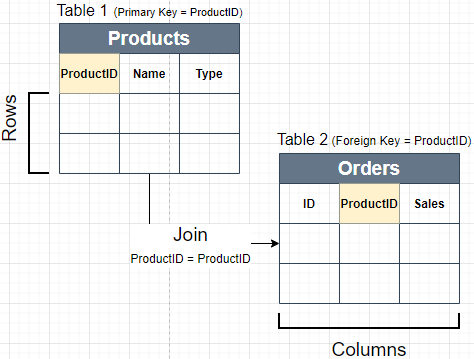
4. What is a Primary Key and Foreign Key Columns?
  • Primary Key: This Column has uniquely values for each row in table. Primary Key Column can’t have repeated values.
  • Foreign Key: This Column refers to a Primary Key in another Table. Foreign Key column can have repeated values.
Database Join
5. Primary Key vs Unique Key Constraints?
  • Primary Key: Used to uniquely identify each row of table. Only one Primary Key is allowed in each table. Can’t have Duplicate or Null Values.
  • Unique Key: Used to uniquely identify each row of table. Multiple unique keys can present in a table. Unique key constraint columns can have NULL values.

Constraints = Rules enforced on the data columns of a table

6. Surrogate Key Column?
  • Column or set of columns declared as the primary key, instead of a “real” or natural key
  • Most common type of surrogate key is an incrementing integer, such as an auto_increment column
7. What is Normalization?

Techniques to group Related information into Separate Tables. Data Normalization is used to reduce data redundancy and improve data integrity. Normalization Increase Database joins as related data is grouped into separate tables to reduce redundancy. Most Asked Normal Forms are below.

  • 1st Normal Form (1NF):
    • Value of each attribute contains only a single value from that domain
    • Each Record is Unique
  • 2nd Normal Form (2NF):
    • Table is in 1NF
    • Single Column Primary Key
  • 3rd Normal Form (3NF):
    • Table is in 2NF
    • There are no transitive functional dependencies
8. What is De-normalization?
  • Combining data from multiple tables into 1 single table
  • Data Redundancy is increased due to repeated column values
  • Denormalization decrease no of join needed to extract data
9. What are ACID Properties?
  • Atomicity: Each transaction is considered as single unit, which either succeed completely or fails completely.
  • Consistency: Any data written to the database must be valid according to all defined rules
  • Isolation: Concurrent execution of transactions leaves the database in the same state that would have been obtained if the transactions were executed sequentially.
  • Durability: Guarantee that once a transaction has been committed, it will remain committed even in the case of a system failure
10. What is Basic Query Structure?

Basic Structure of SQL Query is given below. Database engine first evaluated “From and Join” then “Where”, after that “Group by”, Having ,Select and “Order By” clauses are evaluated.

Query Evaluation Order

Select [Column List]
From [Table Name, Multiple Tables can be joined]
Where [Filtering Condition on Columns]
Group By [Column List on which data needs to be aggregated]
Having [Filtering Condition using Column Aggregation]
Order By [Column List to Sort Data]

11. Difference between Having and Where?

Where: where clause in query can be used to filter data. Attribute / Columns of the tables used in “From” clause of query, can be used to filter data. This filter is evaluated for each rows of data. e.g. (where Column1 = “Some Value”)

Select Column1, Column2
From Table1
Where Column1 = “Hello” OR Column2 != 0

Multiple Filtering Conditions can be combined using “AND, OR” Operators
.

Having: having is used to filter data using aggregate functions. Aggregate functions can’t be used for filtering in “where. e.g.SUM(Sales) > 0″

Select Column1, Sum(Column2)
From Table1

Group By Column1
Having Sum(Column2) > 0


Data is Grouped first in this example. After grouping Filtering is applied using “Sum()aggregate function in Having.

Enable Basic Authentication and SSL on a Mongo DB instance

creating ssl key and certificate for enabling ssl

Run the following command to generate ssl certificate and key file.

openssl req -newkey rsa:2048 -new -x509 -days 365 -nodes -out mongodb-cert.crt -keyout mongodb-cert.key
cat mongodb-cert.key mongodb-cert.crt > mongodb.pem

add the following property to mongod.conf to enable ssl

# network interfaces
net:
  ssl:
    mode: requireSSL
    PEMKeyFile: <path to pem file created above>

Restart mongo db with new configuration.

enable basic authentication

Start MongoDB without access control and create the administrator user.

uses this command to commect to ssl enabled mongo using mong-shell

mongo --ssl --sslAllowInvalidCertificates 

then run the following script

use admin

db.createUser(
  {
    user: "<admin-user>",
    pwd: "<password>",
    roles: [ { role: "userAdminAnyDatabase", db: "admin" } ]
  }
)

or in One liner form

mongo admin --ssl --sslAllowInvalidCertificates  --eval "db.createUser( { user: "<admin-user>", pwd: "<password>", roles: [ { role: "userAdminAnyDatabase", db: "admin" } ] } )"

add the following property in mongod.conf to enable autorization. (default location for mongod.conf is /etc/mongod.conf)

security:
  authorization: enabled

Restart mongo db with new configuration (with access control).

Connect to mongodb instance and authenticate as the user administrator. Add non previlaged users to manage and control access to different DB’s.

mongo --ssl --sslAllowInvalidCertificates --port 27017 -u "root" -p "pass" --authenticationDatabase "admin"
use admin

db.createUser(
    {
      user: "<user>",
      pwd: "<password>",
      roles: [
         { role: "readWrite", db: "test" }
      ]
    }
)

If you have followed the above steps, you have successfully added a new user to your db. Try logging in with the new user and try adding document to some db.

Use Sops for Secrets in Helm

black handled key on key hole

sops is an editor of encrypted files that supports YAML, JSON, ENV, INI and BINARY formats and encrypts with AWS KMS, GCP KMS, Azure Key Vault, age, and PGP.

Helm is an open source package manager for Kubernetes. It provides the ability to provide, share, and use software built for Kubernetes.

Using and storing secrets in Helm poses a problem. If we store secretes in plain text in Helm config files then we can not share and store our Helm configs in version control system. Storing plain text secrets is very bad security practice. To overcome this issue we can used sops with Helm secret plugin to store encrypted secrets in our version control. These secrets will be then be decrypted at install time minimizing the exposure of secret data.

Steps to use Sops for Secrets in Helm

To user sops first you need to install it in your environment. Download the latest release from here and place it in your path.

Next you’ll need to install Helm-secrets plugin. Use the following command to install Helm-secrets plugin.

helm plugin install https://github.com/jkroepke/helm-secrets --version v3.6.0

We’ll create a new chart to create out secret. Creating a chart will also allow us to version it using helm releases.

In this post we are going to encrypt our secret with out pgp key. But we can use a variety of other options including aws kms and gcp kms to encrypt our data.

First create a new Helm chart.

helm create my-secret
cd helm-testses

We will modify Helm chart a bit for our usecase.

Delete everything from except _helper.tpl file.

Update contents of values.yaml file as follwos.

# Default values for app-secrets.
# This is a YAML-formatted file.
# Declare variables to be passed into your templates.

# Name of application that will use secrects and/or certificate
appName: "my-secret"

secrets: {}

Create a file name secrets.yaml in templates directory with following content.

apiVersion: v1
kind: Secret
metadata:
  name: {{ .Values.appName }}-secrets
  labels:
    app: {{ .Values.appName }}-secrets
type: Opaque
data:
{{- range $key, $val := .Values.secrets }}
  {{ $key }}: {{ $val | b64enc | quote }}
{{- end }}

Run gpg --list-secret-keys to list your pgp keys.

➜  my-secret gpg --list-secret-keys
gpg: WARNING: server 'gpg-agent' is older than us (2.2.27 < 2.3.1)
gpg: Note: Outdated servers may lack important security fixes.
gpg: Note: Use the command "gpgconf --kill all" to restart them.
/Users/dir/.gnupg/pubring.kbx
----------------------------------------
sec   ed25519 2021-05-26 [SC] [expires: 2023-05-26]
      7E6CBE978CCACDCBCC4E7F8006A2FX2FAX66X2XX
uid           [ultimate] john doe 
ssb   cv25519 2021-05-26 [E] [expires: 2023-05-26]
ssb   rsa2048 2021-05-26 [A] [expires: 2023-05-26]

Copy the key hash in bold above. We will use it in next step.

Create a new directory and create a file containing your secret ther.

mkdir secrets/my-secret.yaml

Add following content in that file.

secrets:
    MY-SECRET: secret-password

Now we are going to encrypt this file with out pgp key.

sops --encrypt --pgp 7E6CBE978CCACDCBCC4E7F8006A2FX2FAX66X2XX --in-place secrets/secret-one.yml

Now our file is encrypted. It will look like this.

secrets:
    MY-SECRET: ENC[AES256_GCM,data:A24t/SsvsH4=,iv:jefALk6/tRJFbdf0oN1uSYWKBhjU+eThWbGTdDtoBr8=,tag:gf8M+C3we63waHTBijBdYQ==,type:str]
sops:
    kms: []
    gcp_kms: []
    azure_kv: []
    hc_vault: []
    age: []
    lastmodified: "2021-06-11T19:12:12Z"
    mac: ENC[AES256_GCM,data:cMDft0vbpu4tTPDJewmPvVF1ij+PKbCXunJf67S5ODNMoiqIf9Qez6oxWmSzMk1tEF+nTakqgODmTs0LBLsHOUhUS+tC0siPWhaOLSRjzFB1QXDzo4SA/WoVqJ8b4cnpDwcX1yHfqRgMI8bT2Yg3Yb+GEChagEVOS+JEYmu/DSU=,iv:aPfcBnXGIZZ9Nd+3ZW9R1efXCBOyatcl5RHcKtiT86A=,tag:ZtczRHojSG27xAxzKIqlYA==,type:str]
    pgp:
        - created_at: "2021-06-11T19:12:11Z"
          enc: |
            -----BEGIN PGP MESSAGE-----

            hF4DJOQ8uoHoWuYSAQdAiqMYiO4AkRildvkQVKOiMxeGZxCX9mExlbdGHzx7fl0w
            co4VFit40cwo34S02b+FAX7JWxq7UB/MTvxEJyaOXmNysejJW1TutF/lwWRZm1sM
            1GgBCQIVk8xLHsgz0RKzc2ffBmO+smwruPOf9p07zVkGI+qJKFmmf3GlEsBlP30c
            V/wILgREeGj3aiHYFdXVDiZZoe0y3PAto9+W7Sy7NZ1xOWTXQvBbw+DwEg/XkoS0
            fVKJztGiPQGtUA==
            =NvjV
            -----END PGP MESSAGE-----
          fp: 6D6CBE978BEABDBBAC4E7F8006A2FC2FA066824C
    unencrypted_suffix: _unencrypted
    version: 3.7.1

It contains our encrypted secret with some metadata from sops command.

Now we can put this file in our version control system.

When its time to install this secret in out cluster we can do the following steps to install decrypted secret. We will need gpg key in order to decrypt it.

helm secrets install my-secret --atomic -f secrets/secret-one.yml .

In order to just view the rendered helm chart run following command.

helm secrets template my-secret --atomic -f secrets/secret-one.yml .

[helm-secrets] Decrypt: secrets/secret-one.yml
---
# Source: my-secret/templates/secrets.yaml
apiVersion: v1
kind: Secret
metadata:
  name: my-secret-secrets
  labels:
    app: my-secret-secrets
type: Opaque
data:
  MY-SECRET: "cGFzc3dvcmQ="

[helm-secrets] Removed: secrets/secret-one.yml.yaml.dec

So now we have a complete workflow to keep our secret data secret and take full advantage of version control system to manage our helm charts.