Download Neo4j Desktop by Clicking on Download, beside the installer you will get installation key at this step as well. Please note that Installer size is around 575 MB.
Click on Download
Go to Downloads and Run the Installer (Neo4j Desktop Setup 1.4.5.exe)
Once installation starts you can choose if this application is only for you or all the users on this computer
Choose Install Location and Click on Install. For better performance choose SSD drive
Install Location
Installation will take 2-3 minutes to complete. Once Completed click on “Run Neo4j Desktop”.
Run Neo4j Desktop
Choose Private or Public Network in “Windows Firewall” popup, to make Neo4j accessible over the Network.
Windows Firewall Setting
Next Agree to Neo4j License Agreement for Neo4j Desktop
License Agreement
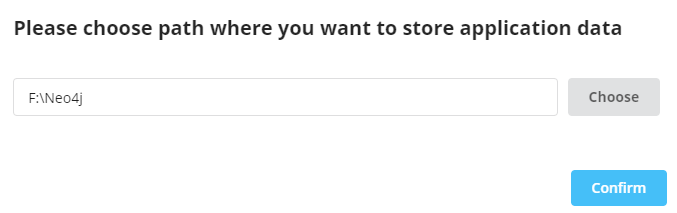
Choose Application Data location on local machine. Once Selected, Click on confirm.
Choose Application Data Location
In this step, Register Neo4j Desktop. Neo4j Desktop is always free, this information is gathered to analyze who is interested in this application.
Software Registration
Installer will check systems requirement and Setup runtime Environment
This article give brief intro to different type of databases that that are available in Market with Sample Use cases. Choosing right database for application is one of the most important decision to make. This comparison can help to chose the right database for the job.
Following different types of databases are evaluated in this post.
Database Types
Key Value
Wide Column
Document
Relational
Graph
Search Engine
1. Key Value Database
What is key values database?
Simplest of NoSQL databases
No SQL type queries and Joins are available for these databases
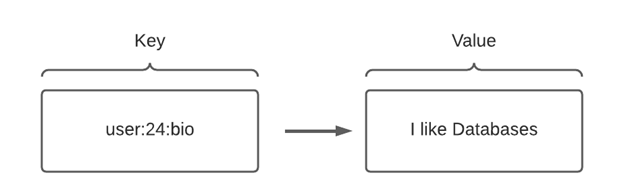
key value databases utilize a single main identifier “Key” and associate that with a data point, array of data, or blob—a “value”
Data can only be queried by passing Key using “Get” command e.g. Get user:24:bio
Key names can be URI, hashes, filenames, or anything else that is entirely unique from other keys
These databases are Simple and lightweight
Built for speed as data is kept in-memory
Data type-agnostic
(Data Agnostic: if the method or format of data transmission is irrelevant to the device or program’s function. This means that the device or program can receive data in multiple formats or from multiple sources but still process that data effectively)
When your application needs to handle lots of small continuous reads and writes, that may be volatile. Key-value databases offer fast in-memory access.
Optimal for situations requiring low latency and lower operational demand than a relational database
For applications that don’t require frequent updates or need to support complex queries
Sample Use Case
E-commerce shopping carts — work best for temporary, lightweight listings, which makes them perfect for storing customer shopping carts while they order products online.
Online session information — Key value databases make it simple to track and store activity information, including which pages were accessed, on-page actions a user took, and more.
Use as Cache– Good option for the information that is access very frequently but updated less often. These databases can be used on top of other persistent data layer as a cache.
2. Wide Column Database
What is Wide Column Database?
NoSQL database that organizes data storage into flexible columns that can be spread across multiple servers or database nodes.
NoSQL database in which the names and format of the columns can vary across rows, even within the same table.
Also known as column family databases. Because data is stored in columns, queries for a particular value in a column are very fast, as the entire column can be loaded and searched quickly. Related columns can be modeled as part of the same column family.
CQL is used as Query Language. Joins are not available.
Decentralized and Scale Horizontally
In Wide Column DB, Outer Layer is Key Space, which hold one or more Column Families. Each Column Family holds set of ordered rows, due to which related data is grouped together.
Extreme write speeds with relatively less velocity reads
Data extraction by columns using row keys
Sample Use Case
Log data
IoT (Internet of Things) sensor data
Time-series data, such as temperature monitoring or financial trading data
Attribute-based data, such as user preferences or equipment features
Real-time analytics
Geographic data
3. Document Database
Documents DB where each Document is collection of Key Value Pairs
What is Document Database?
In this type of Database we have Documents
Document is a container for Key Value Pairs
Documents are Unstructured and Don’t require Schema
Document are grouped together in Collections
Fields in a Collection Can be indexed and Collections can be organized in logic hierarchies
Don’t Support join. This type of DB encourage to embed related data together in same document in de-normalized format
Reads from front end application are faster but write/update operations are complex due to embedded data
Documents and Collections
Popular Database
Mongo DB
Dynamo DB
Firestore
Why Use Document Database?
Your data schema is subject to frequent changes
When we don’t know how schema is going to evolve in future
When the amount of data in many applications cannot be served affordably by a SQL database
Sample Use Case
Mobile Games
IOT
Web Application Data
4. Relational Database
What is Relational Database?
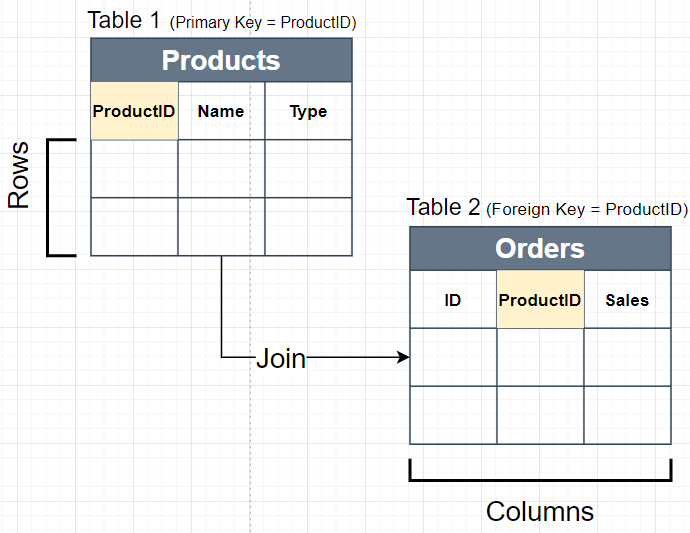
Data is stored in Structures called Tables. Table stores data in Rows and Columns
Tables Required Pre Defined Schema in these databases
ACID (Atomicity, Consistency, Isolation and Durability) compliant. Data validity is guaranteed.
Support SQL (Structured Query Language) Language
Support Joins between Different Tables
Popular Database
My SQL
Microsoft SQL Server
Oracle
Sample Use Case
Online transaction processing (Well suited for OLTP apps because they support the ability to insert, update or delete small amounts of data; they accommodate a large number of users; and they support frequent queries)
IoT solutions (Relational databases can offer the small footprint that is needed for an IoT workload, with the ability to be embedded into gateway devices and to manage time series data generated by IoT devices)
Data warehouses (Relational databases can be optimized for OLAP (online analytical processing) where historical data is analyzed for business intelligence)
5. Graph Database
What is Graph Database?
Database designed to treat the relationships between data as equally important to the data itself. Relationships are stored alongside data in model
Use Cypher Query Language that is very similar to SQL language. As Joins are already stored with Data, due to this cypher queries are very precise
Natively handles Many to Many Relations between data
Can Traverse millions of connections per second per core
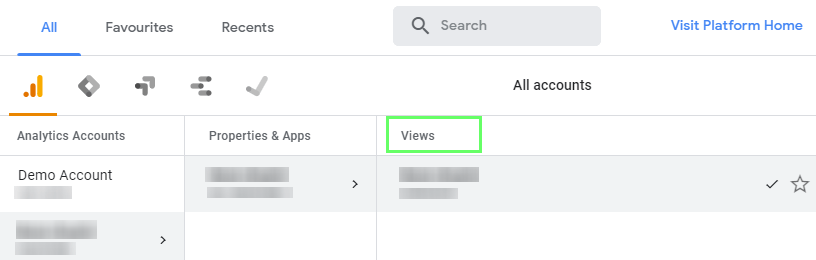
Select GA (Google Analytics) view for which export need to be setup. View can be selected by clicking small arrow as shown in below screenshot
Select GA Property an View
After Selecting View. Go to Admin tab in GA (shown below)
Go to All Products in Admin Tab
Select BigQuery under “All Products” to setup export. Following is needed to setup export
Google Cloud Project ID
Google Analytics View for which Export needs to be setup
Email Address that is available in GA. This will be used to send export completion notifications
Streaming Data Export frequency (batch mode or continuous export)
Note: Setup process with not ask for target BigQuery dataset. It is automatically created once export setup is completed. Dataset will have same name as GA View ID.
Export Validation
Once setup is completed we should be able to see following
Dataset should appear in BigQuery with ID same as GA view
In GA (Admin -> All Product), we should be able to see green check mark for BigQuery. As seen in above screenshot
Table and View may take some time to appear in BigQuery
This post go through pre-requisite and steps to setup Google Analytics data export into Google Bigquery. Following pre-requisites needs to be met before setting-up the export.
Prerequisite
Need to have Google Analytics 360 Account
Need to have Google Cloud Project with Billing Enabled
User that will setup Export need to have following permissions
Editor Access in Google Analytics
Owner Access on Google Cloud Project
Google Cloud Project ID. This will be used during setup Process
For one GA (Google Analytics) Property, export can be setup for only one View at a time
Select GA (Google Analytics) view for which export need to be setup (top left corner). View can be selected by clicking small arrow as shown in below screenshot
Select Account
Select View
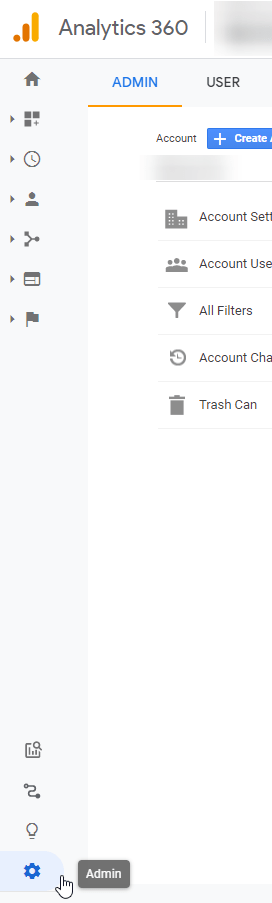
After Selecting View. Go to Admin tab in GA (shown below)
Select Admin from bottom Left
Once on Admin page, select All Products under properties
Select BigQuery under “All Products” to setup export. Following is needed to setup export
Google Cloud Project ID
Google Analytics View for which Export needs to be setup
Email Address that is available in GA. This will be used to send export completion notifications
Streaming Data Export frequency (batch mode or continuous export)
Note: Setup process with not ask for target BigQuery dataset. It is automatically created once export setup is completed. Dataset will have same name as GA View ID.
Export Validation
Once setup is completed we should be able to see following in Bigquery Console
Dataset should appear in BigQuery with ID same as GA view
In GA (Admin -> All Product), we should be able to see green check mark for BigQuery. As seen in above screenshot
Table and View may take some time to appear in BigQuery
Azure Data Factory is a cloud-based Microsoft tool that collects raw business data and further transforms it into usable information. It is a data integration ETL (extract, transform, and load) service that automates the transformation of the given raw data. This Azure Data Factory Interview Questions blog includes the most-probable questions asked during Azure job interviews
Why Azure Data Factory
Cloud Need an Orchestration Tool
Extract Data from Cloud Source
Transform Data using Datafactory workflows
Load/Sink data into Datalake or datawarehouse
Azure Data Factory Concepts
Pipeline: This is list of steps we want to perform in our Data Transformation or Copy task. Steps are called Activities
Activities: Activities represent the processing steps in a pipeline. A pipeline can have one or multiple activities. Activities can be of following types – Data Movement e.g. Copy – Data Transformation Activities e.g. Databrick, Azure Functions – Control Flow Activities e.g. For Each Loop, Lookup, Set Variable
Datasets: Sources of data. In simple words, it is a data structure that holds our data.
Linked services: Connection Strings
Data Factory Concepts Mapping with SSIS
Data Factory
SSIS
Pipeline
Package (*.dtsx) or Control Flow
Activity
SSIS Control flow Components
Linked Services
Connections
Dataset
Connection Mapping
Workflow
Dataflow
ADF Integration Runtime
The Integration Runtime (IR) is the compute infrastructure used by Azure Data Factory to provide the following data integration capabilities across different network environments. – Dataflow – Data Movement – Activity Dispatch – SSIS Package Execution
Azure Integration Run Time: Azure Integration Run Time can copy data between cloud data stores and it can dispatch the activity to a variety of compute services such as Azure HDinsight or SQL server where the transformation takes place
Self Hosted Integration Run Time: Self Hosted Integration Run Time is software with essentially the same code as Azure Integration Run Time. But you install it on an on-premise machine or a virtual machine in a virtual network. A Self Hosted IR can run copy activities between a public cloud data store and a data store in a private network. It can also dispatch transformation activities against compute resources in a private network. We use Self Hosted IR because Data factory will not be able to directly access on-primitive data sources as they sit behind a firewall.
Azure SSIS Integration Run Time: With SSIS Integration Run Time, you can natively execute SSIS packages in a managed environment.
ETL process in Azure Data Factory
Following are high level steps to create a simple pipeline in ADF. Following example copy data from SQL Server DB to Azure Data Lake.
Steps for Creating ETL
Create a Linked Service for source data store which is SQL Server Database
Create Source Dataset using Source Link Service
Create a Linked Service for destination data store which is Azure Data Lake Store
Create Sink/Target Dataset using link Service created in Step 3
Create the pipeline and add copy activity
Schedule the pipeline by adding a trigger
Schedule a pipeline
You can use the scheduler trigger or time window trigger to schedule a pipeline.
Trigger execute Pipelines on a Schedule e.g. Daily at 6 AM
Pass parameters to a Pipeline
You can define parameters at the pipeline level and pass arguments as you execute the pipeline run on demand or by using a trigger.
Define default values for the Pipeline Parameters?
You can define default values for the parameters in the pipelines.
Can an activity output property be consumed in another activity?
An activity output can be consumed in a subsequent activity with the @activity construct.
Azure Data Factory is a cloud-based Microsoft tool that collects raw business data and further transforms it into usable information. It is a data integration ETL (extract, transform, and load) service that automates the transformation of the given raw data. This Azure Data Factory Interview Questions post includes the most-probable questions asked during Azure job interviews
Why Azure Data Factory
Cloud Need an Orchestration Tool
Extract Data from Cloud Source
Transform Data using Datafactory workflows
Load/Sink data into Datalake or datawarehouse
Azure Data Factory Concepts
Pipeline: This is list of steps we want to perform in our Data Transformation or Copy task. Steps are called Activities
Activities: Activities represent the processing steps in a pipeline. A pipeline can have one or multiple activities. Activities can be of following types – Data Movement e.g. Copy – Data Transformation Activities e.g. Databrick, Azure Functions – Control Flow Activities e.g. For Each Loop, Lookup, Set Variable
Datasets: Sources of data. In simple words, it is a data structure that holds our data.
Linked services: Connection Strings
Data Factory Concepts Mapping with SSIS
For those who are coming from conventional SQL Server Integration Services background following table provide high level mapping between different components of SSIS and Azure Data Factory.
Data Factory
SSIS
Pipeline
Package (*.dtsx) or Control Flow
Activity
SSIS Control flow Components
Linked Services
Connections
Dataset
Connection Mapping
Workflow
Dataflow
ADF Integration Runtime
The Integration Runtime (IR) is the compute infrastructure used by Azure Data Factory to provide the following data integration capabilities across different network environments. – Dataflow – Data Movement – Activity Dispatch – SSIS Package Execution
Azure Integration Run Time: Azure Integration Run Time can copy data between cloud data stores and it can dispatch the activity to a variety of compute services such as Azure HDinsight or SQL server where the transformation takes place
Self Hosted Integration Run Time: Self Hosted Integration Run Time is software with essentially the same code as Azure Integration Run Time. But you install it on an on-premise machine or a virtual machine in a virtual network. A Self Hosted IR can run copy activities between a public cloud data store and a data store in a private network. It can also dispatch transformation activities against compute resources in a private network. We use Self Hosted IR because Data factory will not be able to directly access on-primitive data sources as they sit behind a firewall.
Azure SSIS Integration Run Time: With SSIS Integration Run Time, you can natively execute SSIS packages in a managed environment.
ETL process in Azure Data Factory
Following are high level steps to create a simple pipeline in ADF. Following example copy data from SQL Server DB to Azure Data Lake.
Steps for Creating ETL
Create a Linked Service for source data store which is SQL Server Database
Create Source Dataset using Source Link Service
Create a Linked Service for destination data store which is Azure Data Lake Store
Create Sink/Target Dataset using link Service created in Step 3
Create the pipeline and add copy activity
Schedule the pipeline by adding a trigger
Schedule a pipeline
You can use the scheduler trigger or time window trigger to schedule a pipeline.
Trigger execute Pipelines on a Schedule e.g. Daily at 6 AM
Pass parameters to a Pipeline
You can define parameters at the pipeline level and pass arguments as you execute the pipeline run on demand or by using a trigger.
Define default values for the Pipeline Parameters?
You can define default values for the parameters in the pipelines.
Can an activity output property be consumed in another activity?
An activity output can be consumed in a subsequent activity with the @activity construct.











 Simplyfies