
This post covers Basic to Advanced Relational Database interview Questions and Answers. Some of the basic Datawarehouse related concepts are also discussed in this post.
Click on the link to know the difference between different Database Types.
1. What is RDBMS?
- Stands for “Relational Database Management System“
- Rows and Column are used to store data in Structural format
- You need Pre-Defined Schema
2. What is OLTP (Online Transaction Processing)?
- Data processing that executes transaction-focused tasks
- This involves inserting, deleting, or updating small quantities of database data
- These DBs are suitable for Financial, Retail and CRM transactions
3. What is Data Warehousing?
- Process of Collecting and Aggregate Data from Multiple Sources
- Separating Dimensions and Facts into Separate tables
- Optimized for Querying and Analyzing large amount of information
- Support Business Intelligence Systems
Dimension = Typically textual data fields e.g. Date, Product, Employee
Fact = Typically Numerical data fields e.g. Sales, Profit
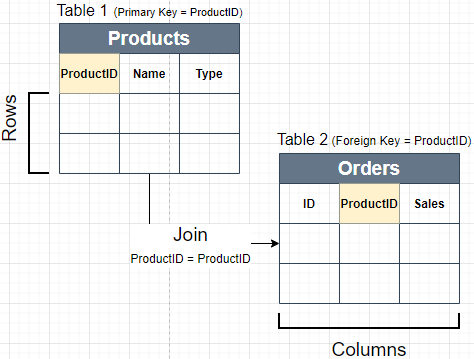
4. What is a Primary Key and Foreign Key Columns?
- Primary Key: This Column has uniquely values for each row in table. Primary Key Column can’t have repeated values.
- Foreign Key: This Column refers to a Primary Key in another Table. Foreign Key column can have repeated values.
5. Primary Key vs Unique Key Constraints?
- Primary Key: Used to uniquely identify each row of table. Only one Primary Key is allowed in each table. Can’t have Duplicate or Null Values.
- Unique Key: Used to uniquely identify each row of table. Multiple unique keys can present in a table. Unique key constraint columns can have NULL values.
Constraints = Rules enforced on the data columns of a table
6. Surrogate Key Column?
- Column or set of columns declared as the primary key, instead of a “real” or natural key
- Most common type of surrogate key is an incrementing integer, such as an auto_increment column
7. What is Normalization?
Techniques to group Related information into Separate Tables. Data Normalization is used to reduce data redundancy and improve data integrity. Normalization Increase Database joins as related data is grouped into separate tables to reduce redundancy. Most Asked Normal Forms are below.
- 1st Normal Form (1NF):
- Value of each attribute contains only a single value from that domain
- Each Record is Unique
- 2nd Normal Form (2NF):
- Table is in 1NF
- Single Column Primary Key
- 3rd Normal Form (3NF):
- Table is in 2NF
- There are no transitive functional dependencies
8. What is De-normalization?
- Combining data from multiple tables into 1 single table
- Data Redundancy is increased due to repeated column values
- Denormalization decrease no of join needed to extract data
9. What are ACID Properties?
- Atomicity: Each transaction is considered as single unit, which either succeed completely or fails completely.
- Consistency: Any data written to the database must be valid according to all defined rules
- Isolation: Concurrent execution of transactions leaves the database in the same state that would have been obtained if the transactions were executed sequentially.
- Durability: Guarantee that once a transaction has been committed, it will remain committed even in the case of a system failure
10. What is Basic Query Structure?
Basic Structure of SQL Query is given below. Database engine first evaluated “From and Join” then “Where”, after that “Group by”, Having ,Select and “Order By” clauses are evaluated.

Select [Column List]
From [Table Name, Multiple Tables can be joined]
Where [Filtering Condition on Columns]
Group By [Column List on which data needs to be aggregated]
Having [Filtering Condition using Column Aggregation]
Order By [Column List to Sort Data]
11. Difference between Having and Where?
Where: where clause in query can be used to filter data. Attribute / Columns of the tables used in “From” clause of query, can be used to filter data. This filter is evaluated for each rows of data. e.g. (where Column1 = “Some Value”)
Select Column1, Column2
From Table1
Where Column1 = “Hello” OR Column2 != 0
Multiple Filtering Conditions can be combined using “AND, OR” Operators.
Having: having is used to filter data using aggregate functions. Aggregate functions can’t be used for filtering in “where“. e.g. “SUM(Sales) > 0″
Select Column1, Sum(Column2)
From Table1
Group By Column1
Having Sum(Column2) > 0
Data is Grouped first in this example. After grouping Filtering is applied using “Sum()” aggregate function in Having.
 Simplyfies